Enterprise VMS Platform · Self-Hosted · AI Analytics Ready
Enterprise Video Management System for Large IP Camera Networks
Live monitoring, DVR archive playback, PTZ control, ONVIF discovery, and fleet health monitoring —
all from one platform. Optional computer vision analytics can be
integrated on customer request for human, vehicle, and object detection workflows.
Computer Vision Products for Security-Oriented Operations
GrapheneVision is the computer vision product line of GrapheneLab, a
security-oriented engineering organization building secure messenger and cloud systems. My-VMS sits
within this ecosystem alongside products for identity verification and AI detection.
Product EcosystemVideo management, identity verification, and AI detection products built for specific
operational problems.
Security-Oriented EngineeringShaped by GrapheneLab's focus on secure systems, practical infrastructure, and data
control.
AI Detection On RequestCustomer-specific human, vehicle, and object detection workflows can be integrated with VMS
operations.
Platform Architecture
One Unified System Replacing a Dozen Point Solutions
Large camera networks create vendor, bandwidth, archive, health-monitoring, and
analytics complexity. My-VMS centralizes those workflows in one self-hosted platform with optional
AI detection integrations.
IP Cameras
RTSP-compatible IP cameras
RTSP · ONVIF
Stream Ingest via FFmpeg
Media Servers
Distributed, load-balanced stream distribution
HLS · FLV · WebRTC/WHEP
Browser Delivery
Browser Operators
Secure access from any modern browser, anywhere
React 18 · TypeScript
Go Backend API
REST API · PTZ Control · Health Polling · Archive Search · Fleet
Management
▼
PostgreSQL Database
Camera Registry · Recording Index · ONVIF Configs · Fleet Hierarchy
Self-Hosted Deployment
Full data sovereignty. Deploy on your own Linux infrastructure — your data never leaves your
network.
Horizontal Scaling
Add media server instances as your camera fleet grows, with camera streams spread across the
available servers.
No Client Software
No proprietary client software required. Operators work from Chrome, Firefox, or Edge.
Core Capabilities
Everything Your Security Operations Center Needs
Nine purpose-built modules, tightly integrated into a single coherent platform.
01
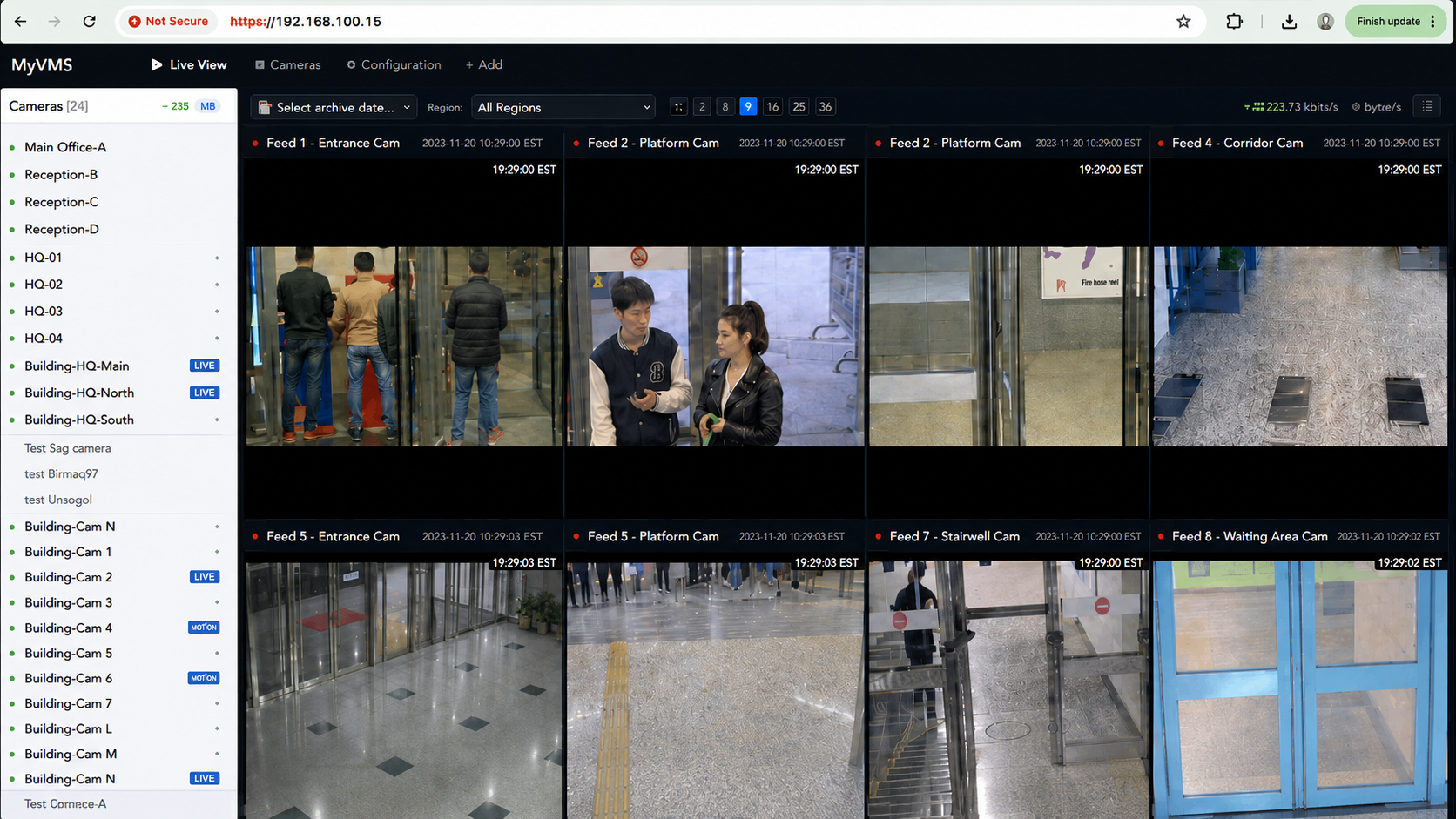
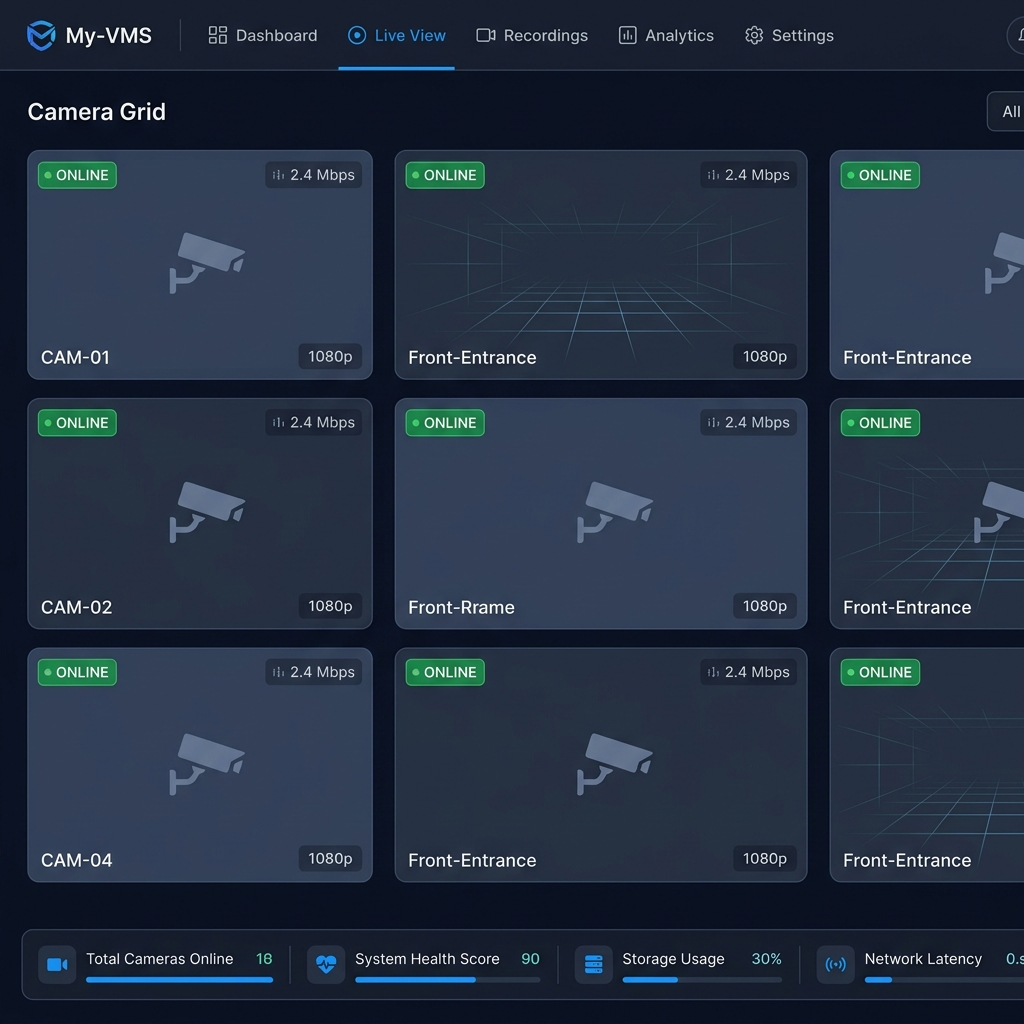
Live Multi-Camera Dashboard
Configurable grid supporting 1 to N cameras simultaneously. Drag-and-drop tile rearrangement,
fullscreen per-camera mode, and visual online/offline status badges. Sub-2-second glass-to-glass
latency via HTTP-FLV and HLS.
Configurable GridDrag & DropHLS / HTTP-FLV
02
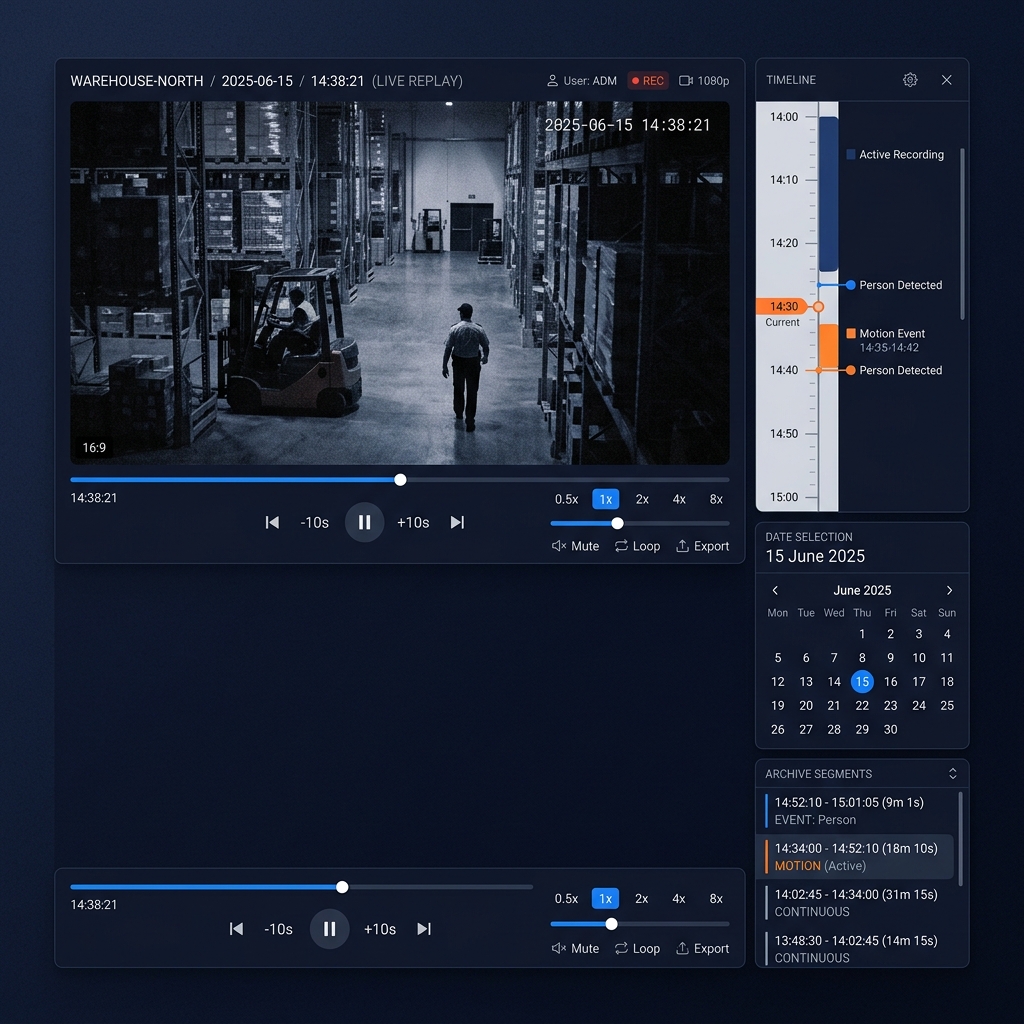
DVR Recording & Archive Search
Continuous MP4 recording auto-segmented into 10-minute chunks, date-organized by
/YYYY/MM/DD/HH/. Instant timestamp search, seamless dual-buffer cross-segment
playback, and multi-speed controls at 0.5×, 1×, 2×, 4×.
MP4 SegmentsTimestamp SearchMulti-Speed Playback
03
PTZ Control
Auto-detects manufacturer on first use. Full pan, tilt, zoom with adjustable speed. Preset
management: save, list, and recall. Supports Hikvision, Dahua, Axis, and Hanwha/Samsung
natively.
Auto-DetectPresets
04
ONVIF Discovery
Auto-discover cameras on the local network, pull manufacturer and model metadata, and retrieve
RTSP stream URLs — all via standard ONVIF protocol. Bulk credential management for fleet-wide
configuration.
Auto-DiscoveryBulk Config
05
Camera Fleet Management
Full hierarchy management: Region → District → Group → Camera. Per-camera detail view with live
feed, archive, and configuration tabs. Start/stop stream ingestion on demand.
Hierarchical OrgCRUD
06
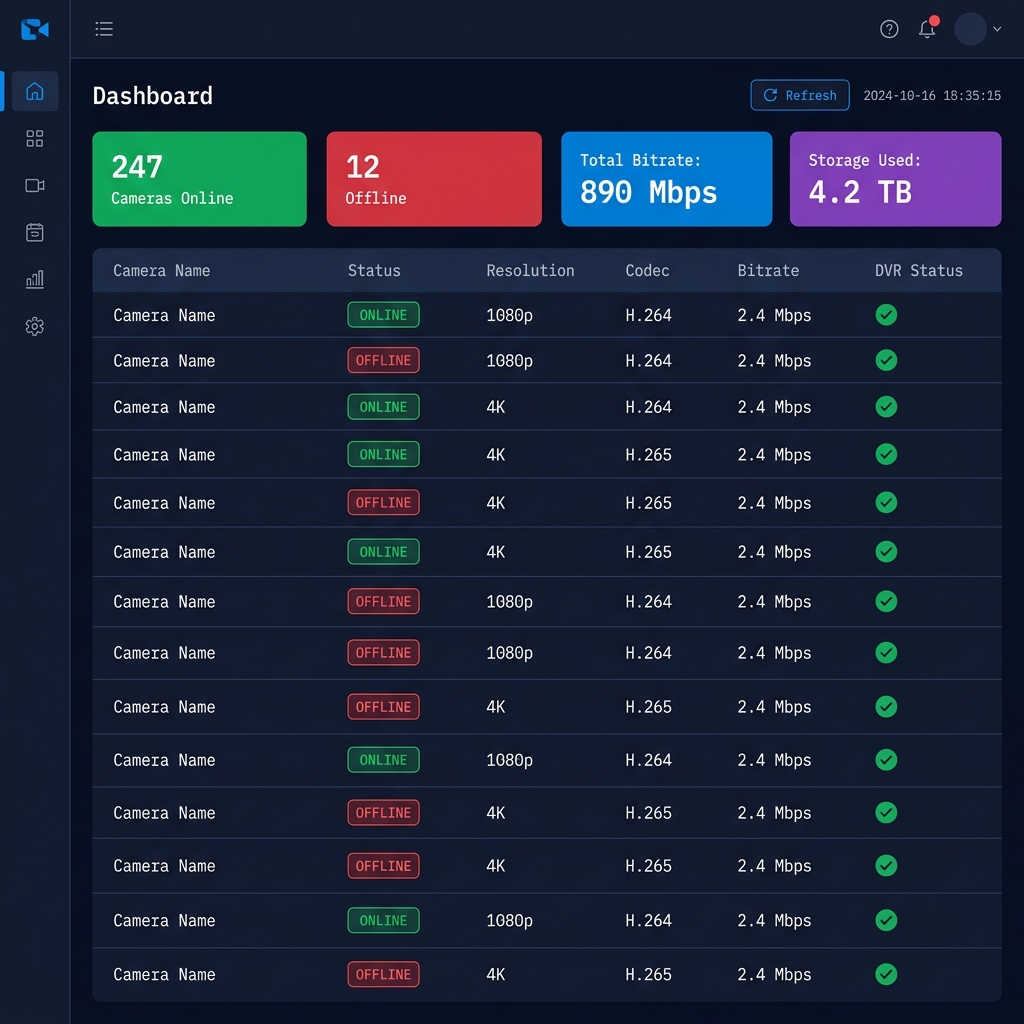
Stream Health Monitoring
30-second telemetry polling delivers per-camera metrics: bitrate, resolution, codec, and DVR
write status. Fleet-wide dashboard shows real-time online/offline counts across your entire
deployment.
30s PollingBitrate Metrics
07
WebRTC Playback
WHEP (WebRTC-HTTP Egress Protocol) proxy delivers ultra-low-latency browser playback — measured
in milliseconds, not seconds. Ideal for real-time PTZ monitoring and incident response.
WHEP Protocol<500ms Latency
08
Disk Synchronization
Background scanner reconciles filesystem MP4 files with database records. Automatically recovers
orphaned recordings after server restarts or crashes — no manual intervention required.
Auto-RecoveryCrash-Safe
09
AI Detection Integration
Designed to support optional computer vision analytics for customer-specific workflows,
including human, vehicle, and object detection. Detection events can support alerts, overlays,
and searchable metadata.
On RequestObject DetectionEvent Metadata
Live Monitoring
Command-Level Situational Awareness
Your entire camera network, on one screen. Laid out exactly how your operators
need it.
Configurable Camera Grid — Scale from 1 to hundreds of cameras. Operators
choose their layout per shift and per screen.
Drag-and-Drop Layout — Rearrange camera tiles in real-time. No page
reload, no mode switching.
Per-Camera Fullscreen Mode — Instant fullscreen with one click. Direct
archive access without leaving the view.
Online/Offline Status Badges — Instantly see which cameras are live and
which need attention, per tile.
HLS, HTTP-FLV & WebRTC Playback — Choose latency profile per camera: HLS
for reliability, HTTP-FLV for low-latency, WebRTC/WHEP for real-time PTZ response.
DVR Archive
Frame-Accurate Incident Review
Find historical footage by timestamp, review incidents smoothly, and move
through archived segments without file browsing.
Continuous MP4 Recording — Auto-segmented into 10-minute chunks.
Date-organized storage: /YYYY/MM/DD/HH/ for predictable retrieval.
Exact Timestamp Search — Enter a date and time, jump directly to the right
segment. No scrubbing required.
Seamless Cross-Segment Playback — Dual-buffer player transitions invisibly
between 10-minute files. No interruptions at segment boundaries.
Multi-Speed Playback — 0.5×, 1×, 2×, 4× speeds. Review long incidents at
4× without missing critical moments.
Live Recording Support — Plays back in-progress recordings
(.mp4.tmp growing files) without waiting for segment completion.
PTZ & ONVIF
Vendor-Agnostic Camera Control
One interface for supported PTZ camera manufacturers. Zero manual driver
configuration.
Supported Manufacturers
HikvisionISAPI Protocol
Supported
DahuaCGI Protocol
Supported
AxisVAPIX Protocol
Supported
Hanwha / SamsungSunAPI Protocol
Supported
ONVIF Auto-Discovery
1
Network Scan
My-VMS broadcasts ONVIF discovery probe to your camera subnet.
2
Metadata Pull
Camera manufacturer, model name, and RTSP stream URL retrieved automatically.
3
Bulk Configuration
Apply credentials and stream settings across your entire discovered fleet in one
action.
4
PTZ Auto-Detection
Manufacturer fingerprinted on first PTZ interaction — no manual driver selection
ever.
Fleet Health
Know Your Entire Network at a Glance
Real-time telemetry across every camera, updated every 30 seconds. No surprises
during incidents.
Online
Cameras Online
Alert
Offline / Alert
Bitrate
Stream Telemetry
DVR OK
Write Status
Per-Camera Telemetry — Bitrate, resolution, codec (H.264/H.265), and DVR
write status per camera, updated every 30 seconds.
Fleet-Wide Online/Offline View — At-a-glance counts for camera
availability across all regions and districts.
DVR Write Status — Know which cameras are recording successfully and which
have write failures — before an incident demands the footage.
Technical Architecture
Built on a Modern, Production-Ready Stack
Open, auditable, and deployable on your own infrastructure — no black boxes, no
vendor lock-in.
Browser Frontend
Operator interface for live monitoring, archive playback, PTZ control, and fleet health
workflows from a modern browser.
React 18 · TypeScript · HLS.js · FLV.js
Backend API
Go service for camera management, PTZ proxying, archive search, health polling, and ONVIF
discovery workflows.
Go 1.21 · Gin HTTP Framework
Database & Archive Index
PostgreSQL stores the camera hierarchy, ONVIF configuration, and searchable recording metadata
used for timestamp-based archive lookup.
PostgreSQL 12+ · Recording Metadata
Media Ingest
FFmpeg ingests compatible RTSP camera streams and feeds the media pipeline for live delivery and
DVR recording.
RTSP → RTMP · MP4 DVR Recording
Browser Playback
Live and archive streams are delivered through browser-friendly protocols for different latency
and reliability needs.
HLS · HTTP-FLV · WebRTC/WHEP
Self-Hosted Deployment
Runs on Linux infrastructure with PostgreSQL, FFmpeg, network-mounted storage, and layer-2 access
to the camera subnet.
Ubuntu 20.04+ · FFmpeg · Network Storage
Camera Layer
📷 IP Cam 1
📷 IP Cam 2
📷 IP Cam N
RTSP · ONVIF
FFmpeg Ingest
Media Layer (Distributed)
⚡ Media Server :1
⚡ Media Server :2
⚡ Media Server :N
HLS · HTTP-FLV · WebRTC/WHEP · DVR MP4
Go API + PostgreSQL
Operator Layer
🖥 Operator 1
🖥 Operator 2
🖥 Operator N
React 18 · TypeScript · Any Browser
Industries
Built for Organizations That Operate at Scale
My-VMS serves any organization managing large, distributed camera networks that
demand reliability and operator accountability.
Government & City Surveillance
Manage hundreds of traffic, street, and public safety cameras across districts from a single
control room. ONVIF auto-discovery scales fleet management without manual provisioning.
Traffic MonitoringPublic SafetyMunicipality Control
Warehouses & Logistics
24/7 recording across loading docks, storage aisles, and perimeter cameras. Instant archive
search for incident investigation with multi-speed playback for rapid review.
Incident ReviewPerimeter SecurityLoss Prevention
Retail Chains
Centralized monitoring of multi-store camera networks. Operator teams review footage across
dozens of locations without vendor-specific client software for each store system.
Multi-Store ViewShrinkage ControlQueue Analysis
Corporate Offices
Secure access control and lobby monitoring integrated with PTZ cameras on every floor. Stream
health dashboard ensures security teams are never flying blind.
Access PointsExecutive FloorsParking Structures
Schools & Campuses
Unified monitoring across classrooms, hallways, parking lots, and campus perimeters. DVR
recording supports incident reconstruction and safety audits.
High-camera-density environments like factories, power plants, and refineries demand stream
reliability and archive accuracy. My-VMS scales to hundreds of concurrent feeds.
Process MonitoringSafety CompliancePerimeter Control
FAQ
Common Questions
Everything you need to evaluate My-VMS for your organization.
My-VMS is designed to scale horizontally. Camera streams can be distributed across multiple
media server instances, so capacity can grow with the camera fleet through configuration.
Deployments with 100+ concurrent streams are supported.
RTSP-compatible camera streams can be ingested by My-VMS. PTZ control supports Hikvision
(ISAPI), Dahua (CGI), Axis (VAPIX), and Hanwha/Samsung (SunAPI) natively, with automatic
vendor detection on first PTZ use. ONVIF-compatible cameras can be auto-discovered and
configured without manual provisioning.
My-VMS is 100% self-hosted. All video recordings are stored as MP4 files on your own Linux
server's filesystem or network-mounted storage. No data is sent to any cloud service. You
retain full data sovereignty and can apply your own retention and encryption policies.
None. My-VMS is entirely browser-based. Operators access the dashboard through Chrome,
Firefox, or Edge with zero installation required. The React 18 frontend handles live
streaming, archive playback, PTZ control, and fleet monitoring natively in the browser using
HLS.js, FLV.js, and the WebRTC API.
Yes. Recordings are indexed for fast timestamp search. Enter a camera and time, and My-VMS
resolves the matching 10-minute segment for playback. Footage retention is limited only by
your storage capacity. Operators can also play at 4× speed to review long time windows
rapidly.
My-VMS includes a background Disk Synchronization scanner that reconciles filesystem MP4
files with the database on startup. Any orphaned recordings created before a crash are
automatically discovered, registered in the database, and made available for playback. No
manual intervention is required.
Yes. My-VMS can be extended with optional computer vision analytics for customer-specific
use cases such as human, vehicle, and object detection. Detection events can be integrated
into alerts, overlays, and searchable archive metadata depending on the deployment.
Enterprise Video Management
Ready to Unify Your Camera Network?
My-VMS consolidates your entire camera fleet — from live monitoring to archive search
— into a single, self-hosted, browser-based platform. Built for operators who need reliability, not
complexity.